How Loud Should My Song Be For Spotify?
UNDERSTANDING -14 LUFS AND SPOTIFY NORMALIZATION
Getting your track’s loudness right for Spotify is critical. While Spotify normalizes playback to -14 LUFS by default, loudness normalization is optional and can be turned off by any listener in their app settings. Because professional commercial tracks on Spotify average around -8 LUFS, mastering between -14 and -8 LUFS ensures your music sounds full and competitive whether normalization is enabled or disabled.
Target -14 to -8 LUFS • Stay Competitive Everywhere
How Spotify Volume Normalization Works
By default, Spotify enables audio normalization for all users in their app settings. When enabled, this system uses the ReplayGain algorithm (and ITU-R BS.1770 standards) to analyze the integrated LUFS of a track and adjust its playback volume to match a target of -14 LUFS.
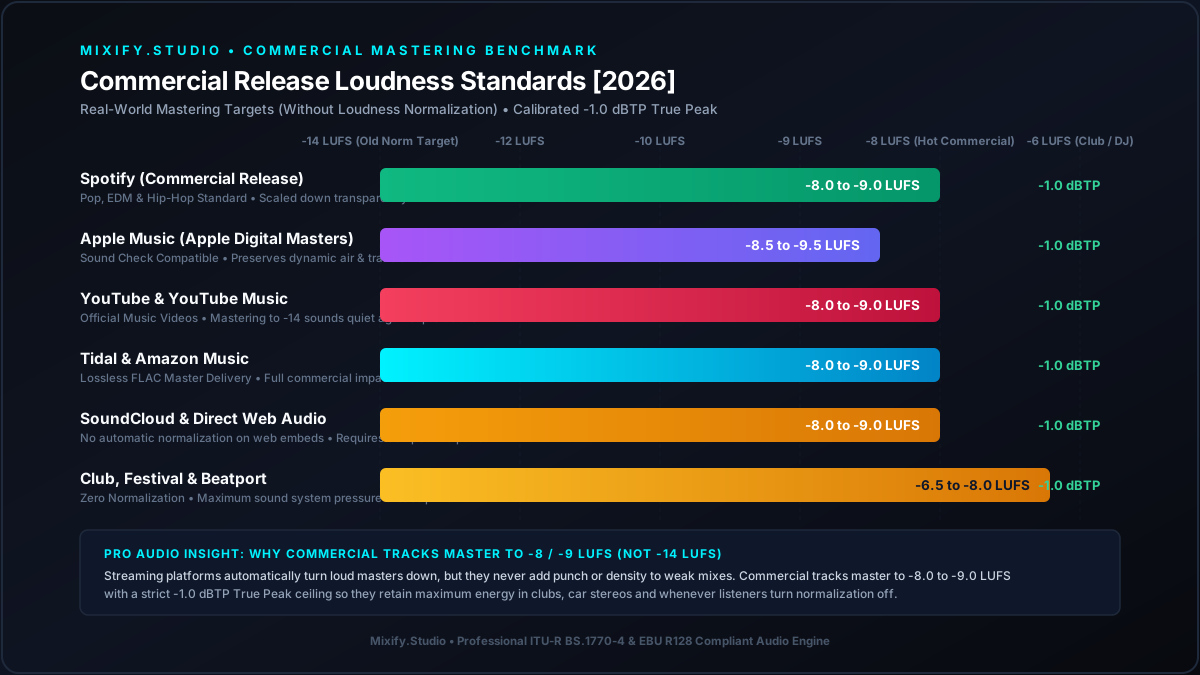
Standardized Integrated LUFS and True Peak ceiling limits across major streaming platforms in 2026.
Why Professional Tracks Master Louder (-8 LUFS)
While Spotify turns down tracks louder than -14 LUFS when normalization is active, loudness normalization is optional and can be disabled by users in their app settings. In fact, -8 LUFS is the average loudness of professional commercial tracks on Spotify! Mastering around -8 LUFS ensures your track matches the loudness of major commercial releases for listeners who turn normalization off, while still normalizing cleanly when it is on.
When Your Track is Too Quiet
If your track is -18 LUFS, the streaming service will attempt to turn it up. However, to prevent digital clipping, playback DSP uses a limiter when applying positive gain. This limiter can alter the sound and transients of your track, which is usually undesirable.
- The platform targets -14 LUFS integrated loudness by default when enabled.
- Users can turn normalization completely off or change settings to "Quiet" (-23 LUFS) or "Loud" (-11 LUFS), with "Normal" (-14) as default.
- Album normalization is used when listening to a full album, keeping relative volumes between tracks intact.
Streaming True Peak Recommendations
Because the service uses Ogg Vorbis for desktop apps and AAC for web playback, engineers provide strict True Peak recommendations.
The Standard -1 dBTP Rule
For tracks mastered to -14 LUFS or quieter, delivery guidelines recommend leaving a maximum True Peak level of -1 dBTP. This 1dB of headroom prevents clipping during the encoding process.
The -2 dBTP Rule for Loud Tracks
If you master your track for competitive commercial loudness (such as -10 or -8 LUFS), technical guidelines recommend leaving -2 dBTP of headroom. Louder tracks suffer more extreme peak increases during lossy encoding, requiring extra headroom.
Mastering for Spotify with Mixify
Our AI engine takes the guesswork out of streaming loudness requirements.
Frequently Asked Questions
Nail Your Spotify Master
Use AI to instantly achieve the perfect loudness and dynamic range for Spotify.
No credit card required · 5x 60s Free Previews / Month · Lossless WAV download