Perfectly Mastered for Spotify
Master for Spotify's loudness normalization, protect transients against lossy transcoding and deliver release-ready audio.
Preparing your music for Spotify involves far more than hitting a generic loudness number. While Spotify targets -14 LUFS by default when loudness normalization is enabled, millions of listeners disable normalization entirely or stream across high-fidelity car systems and club sound setups. Delivering a competitive master requires balancing dynamic punch with strict True Peak protection so your music sounds full, impactful and artifact-free across every streaming device.
Mixify automatically calibrates LUFS targets and enforces True Peak protection.
How Spotify Loudness Normalization Actually Works
Spotify uses the ITU-R BS.1770-4 loudness measurement standard to calculate the integrated loudness of your track across its entire duration. When normalization is active in listener settings, the playback engine applies linear gain attenuation:
The Loudness Penalty Myth
A common misconception among music producers is that Spotify actively compresses, limits or alters the dynamic structure of songs mastered louder than -14 LUFS. In reality, Spotify simply applies a clean linear gain attenuation fader (gain = 10^((-14 - LUFS)/20)). A master sitting at -9 LUFS is attenuated by 5 dB during normalized playback, but its dynamic range, transient punch and crest factor remain completely untouched.
Why Commercial Releases Average -8 to -10 LUFS
Major label releases across pop, electronic music, hip-hop and rock consistently master between -8 and -10 LUFS. Because users can toggle off loudness normalization in Spotify settings, tracks mastered conservatively at -14 LUFS will sound quiet and thin compared to mainstream releases when normalization is disabled or when played via web players, DJ apps and social media integrations.
The Danger of Under-Mastering (Tracks Below -14 LUFS)
If you submit a quiet track measured at -18 LUFS, Spotify applies positive gain (+4 dB) to bring it up to reference level. To prevent digital overs from clipping the audio buffer, Spotify runs quiet tracks through an internal peak limiter set with a 5 millisecond attack and 100 millisecond release. You never want Spotify's automated limiter squashing your master; mastering above -14 LUFS ensures your own limiter defines your sound.
Spotify Listener Playback Modes Explained
Listeners on Spotify Premium can choose between three distinct normalization profiles in their audio settings. Your master must perform consistently across all three modes:
2026 Spotify Technical Specifications & Standards
Mastering to modern aggregator specifications guarantees zero distortion, fast catalog ingestion and clean playback translation across all mobile devices and desktop clients.
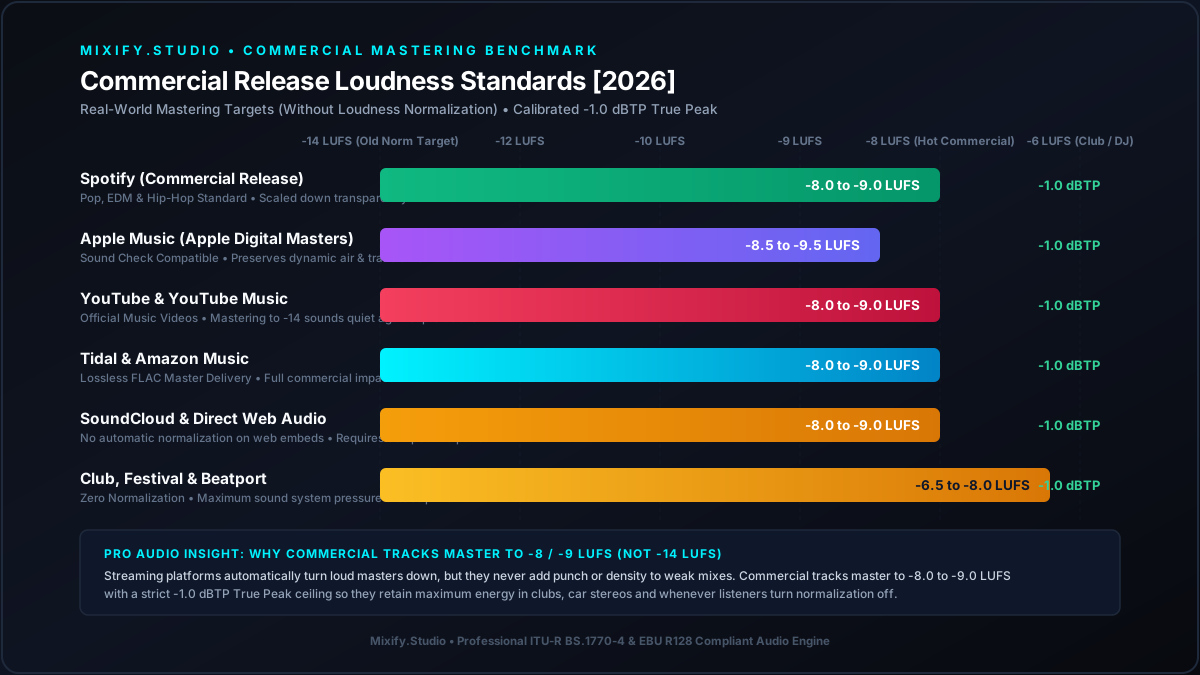
Standardized Integrated LUFS and True Peak ceiling limits across major streaming platforms in 2026.
| Technical Metric | Target Specification | Acoustic & Delivery Purpose |
|---|---|---|
| Integrated Loudness (Normal) | -14 LUFS (+/- 0.5 LUFS) | Spotify's standard default normalization target. |
| Commercial Genre Target | -8 to -10 LUFS (Pop / EDM / Hip-Hop) | Matches commercial track loudness when normalization is off. |
| True Peak (<= -14 LUFS) | -1.0 dBTP | Prevents inter-sample clipping during lossy format conversion. |
| True Peak (> -10 LUFS) | -1.5 to -2.0 dBTP | Recommended by Spotify for dense, loud commercial masters. |
| Master Delivery Format | 24-bit / 44.1 kHz or 96 kHz Lossless WAV | Required by distributors (DistroKid, TuneCore and CD Baby). |
| Lossy Streaming Codecs | Ogg Vorbis (Android/PC) & AAC (iOS/Web) | Codecs applied by Spotify after aggregator catalog delivery. |
| Stereo Phase Correlation | +0.5 to +1.0 | Protects bass clarity when summed to mono on phone speakers. |
The -1 dBTP to -2 dBTP Rule: Preventing Inter-Sample Clipping
Spotify does not stream lossless WAV files to everyday listeners. High-resolution files delivered by your distributor are transcoded into lossy codecs: Ogg Vorbis at 96, 160 or 320 kbps on desktop and Android along with AAC at 128 or 256 kbps on iOS and web players.
- Lossy psychoacoustic encoding synthesizes sub-band filters rather than preserving exact sample points, shifting audio waveforms across time and frequency.
- These waveform shifts create inter-sample peaks (ISPs) that can jump +0.5 dB to +1.2 dB higher than the original digital sample ceiling.
- If a master peaks at 0.0 dBFS, the resulting transcoded streaming file will violently exceed the digital ceiling, creating audible digital distortion, crackling transients and harsh playback on smartphones.
- Spotify officially mandates leaving at least -1.0 dBTP of headroom for standard masters and -2.0 dBTP for tracks louder than -10 LUFS to absorb lossy codec overshoot.
- Mixify utilizes polyphase oversampled True Peak detection to mathematically eliminate inter-sample violations before final export.
Mastering AI-Generated Tracks for Spotify Release
Music generated with Suno, Udio and modern AI models presents distinct acoustic challenges that often trigger rejection or sonic degradation when submitted to Spotify through distributors:
Eliminating High-Frequency Metallic Artifacts
Generative audio engines frequently exhibit high-frequency phase ringing, metallic noise and harsh sibilance between 6 kHz and 14 kHz. When processed through Spotify's lossy compression, these artifacts become smeared and fatigue the listener's ears. Mixify's neural de-shimmer algorithms suppress metallic artifacts while maintaining vocal air and brightness.
Sub-Bass Mono Consolidation & Headroom Recovery
AI generators often introduce out-of-phase stereo information in the sub-bass frequencies below 100 Hz. This wastes vital limiter headroom and creates severe phase cancellation on mono club sound systems and mobile phones. Mixify pins all bass content below 120 Hz straight to mono and filters sub-audible rumble below 30 Hz.
Restoring Transient Punch & Dynamic Crest
AI audio outputs suffer from pre-compressed transients where kick drums and snare hits lack physical impact. Mixify's multi-stage dynamic processing reconstructs transient edges before final True Peak limiting, ensuring your AI track punches through commercial playlists with full authority.
How Mixify Delivers Spotify-Ready Masters in Seconds
You do not need an expensive analog mastering chain or complex metering plugins to meet Spotify's strict streaming requirements. Mixify automates the entire mastering pipeline with studio precision:
Automated Multi-Stage Dynamics
Our engine measures your mix's crest factor and spectral distribution, applying surgical multiband compression to achieve your target loudness (-14 LUFS for maximum dynamics or -8 LUFS for commercial loudness) without crushing your mix.
Lossless Studio Export for Distribution
Mixify generates bit-perfect 24-bit 44.1 kHz WAV files fully compliant with DistroKid, TuneCore, CD Baby and all major music distributors for immediate Spotify delivery.
Frequently Asked Questions
Master your tracks for Spotify with confidence.
Hit target loudness from -14 to -8 LUFS with True Peak ceiling protection and studio-grade audio quality.
No credit card required · 5x 60s Free Previews / Month · Lossless WAV download